From headset streaming, dual-controller tracking, end-effector mapping, and dual-arm motion generation, to simulation state synchronization and recording — integrating the previously fragmented VR and robotics software stacks into an Isaac Sim Extension that can be practically used for demonstration data generation.
Background
Why collect simulated trajectory data?
High-quality demonstration trajectories are an essential foundation for imitation learning, VLA, and dexterous manipulation research. Compared with programming robots joint-by-joint or dragging targets through a keyboard-and-mouse interface, teleoperation allows human operators to directly transform their spatial understanding and manipulation experience into robot motion trajectories: humans determine "how the task should be completed", while the system is responsible for stably and completely recording the actions.
From the perspective of data sources, demonstration trajectories can be divided into simulation (Simulation, Sim) and real-world (Real) datasets. The advantage of simulation data lies in its strong scalability. For example, when sufficient assets are available, simulation can rapidly generate diverse scenarios including intra-category object variations, position randomization, lighting randomization, and background randomization, thereby improving the generalization capability of algorithms. Meanwhile, simulation environments support automatic task reproduction and can construct closed-loop simulation evaluation pipelines that are as close as possible to the real physical world.
In contrast, the advantage of real-world data is that the collected policies can be directly deployed on physical robot systems, but the cost of data collection and evaluation is usually much higher. Currently, most robot policies still face significant distribution differences between simulated and real-world data. Many benchmarks trained on simulation data cannot guarantee that the policies will directly generalize to real environments, namely the existence of the Sim2Real Gap problem. To address this issue, real-world data is often incorporated for supervised fine-tuning. Other approaches include aligning simulation physical parameters or using vision rendering methods based on real-world distributions to alleviate this gap.
Although differences still exist between simulation and real environments, they share certain correlations in terms of task structures and policy effectiveness evaluation. Therefore, simulation data can still serve as an important source for policy pre-training, rapid validation, and algorithm iteration.
Why choose VR for teleoperation?
For simulated data collection scenarios, demonstration data for simple Pick and Place tasks can usually be collected through automated methods. A common approach is to first obtain the target pose of the end-effector (EEF), and then use a Motion Planner (such as cuRobo) for trajectory planning. However, for more complex tasks, such as skill-based manipulation involving flipping and rotation, articulated object interaction, and fine assembly tasks, relying solely on planners for trajectory solving is insufficient and often requires manual trajectory design, making it difficult to maintain a fully automated pipeline.
Furthermore, from the perspective of robot learning, the Action signals provided by teleoperation contain not only motion trajectory information but also incorporate human operators' understanding of spatial relationships, task objectives, and manipulation strategies, enabling the generation of demonstration data that better captures behavioral intent.
Since teleoperation usually requires human involvement, the data collection process is time-consuming and costly. Therefore, researchers have proposed various teleoperation tools and interaction methods to improve collection efficiency, success rate, and data quality.
From the perspective of observation methods, when operators observe robot environments only through a single viewpoint on a 2D display, the lack of depth information can easily lead to difficulties in spatial perception, occlusion issues, and unnatural operation in complex tasks. In comparison, VR provides a more natural three-dimensional observation method, allowing operators to directly perceive spatial relationships and effectively reducing the above issues.
From the perspective of input methods, the most direct approach is master-slave robotic arm-based teleoperation: the operator controls a real robotic arm, and the system maps its joint states to a robotic arm in the simulation environment, achieving highly consistent motion reproduction with a good operation experience. Another common approach is using VR controllers as input devices for the end-effector (EEF), where robot joint states are obtained through inverse kinematics (IK) solving. Additionally, various other input methods exist, such as exoskeleton devices (more suitable for mapping to humanoid robots), 3D mice, and gesture-recognition-based teleoperation methods (such as the low-cost gesture teleoperation system I previously implemented in the InternUtopia project).
In summary, VR teleoperation mainly addresses three key problems in traditional robot teleoperation:
- Natural Input: Controllers directly provide the position and orientation of both hands, making them suitable for mapping dual-arm end-effectors. Meanwhile, joysticks, triggers, and buttons can extend interaction capabilities such as viewpoint switching and function control, improving operational comfort during data collection.
- Immersive Observation: Operators can freely observe occlusion relationships, contact states, and assembly processes around the robot environment without frequently switching between multiple 2D viewpoints, thereby improving the success rate of complex fine manipulation tasks.
- Lightweight Hardware: A consumer-grade VR device (such as Quest 3/3S) can simultaneously provide head tracking, hand tracking, interactive input, and visual display capabilities, significantly lowering the hardware barrier for teleoperation systems.
Why choose Linux + Isaac Sim to rebuild a teleoperation framework?
Isaac Sim is a robotics simulation platform officially developed by NVIDIA. It features a high update frequency and a comprehensive ecosystem, making it one of the mainstream robot simulators currently available. However, during practical testing, it was found that some Isaac Sim versions exhibit differences in rendering, physical behaviors, and XR runtime performance between Windows and Linux platforms. Meanwhile, subsequent robot training and evaluation pipelines are usually based on Linux environments. To avoid changes in contact behaviors or simulation result deviations after collecting data in Windows and migrating to Linux, it is preferable to collect demonstration data on Linux.
This introduces several engineering challenges: Linux environments lack the official Quest Link desktop connection solution, and Quest, ALVR, SteamVR, OpenVR, Isaac XR, and robot control systems must collaborate across multiple software layers. Within this pipeline, several issues exist:
- The headset displaying images does not necessarily mean Isaac can correctly receive controller inputs;
- Controllers working properly in SteamVR do not necessarily mean that the Isaac Action Map can correctly match the devices;
- A controller model being able to move does not necessarily mean the coordinate mapping is suitable for robot control;
- A robot being able to follow motion does not necessarily mean trajectories can be synchronized and recorded at the correct simulation timestep;
- Successfully starting VR for the first time does not necessarily mean the XR lifecycle can safely execute the Stop → Start restart process.
Therefore, the core of this project is to construct a reusable engineering system that integrates hardware connection, video streaming, XR input, robot control, and demonstration data collection.
Final Results and Features
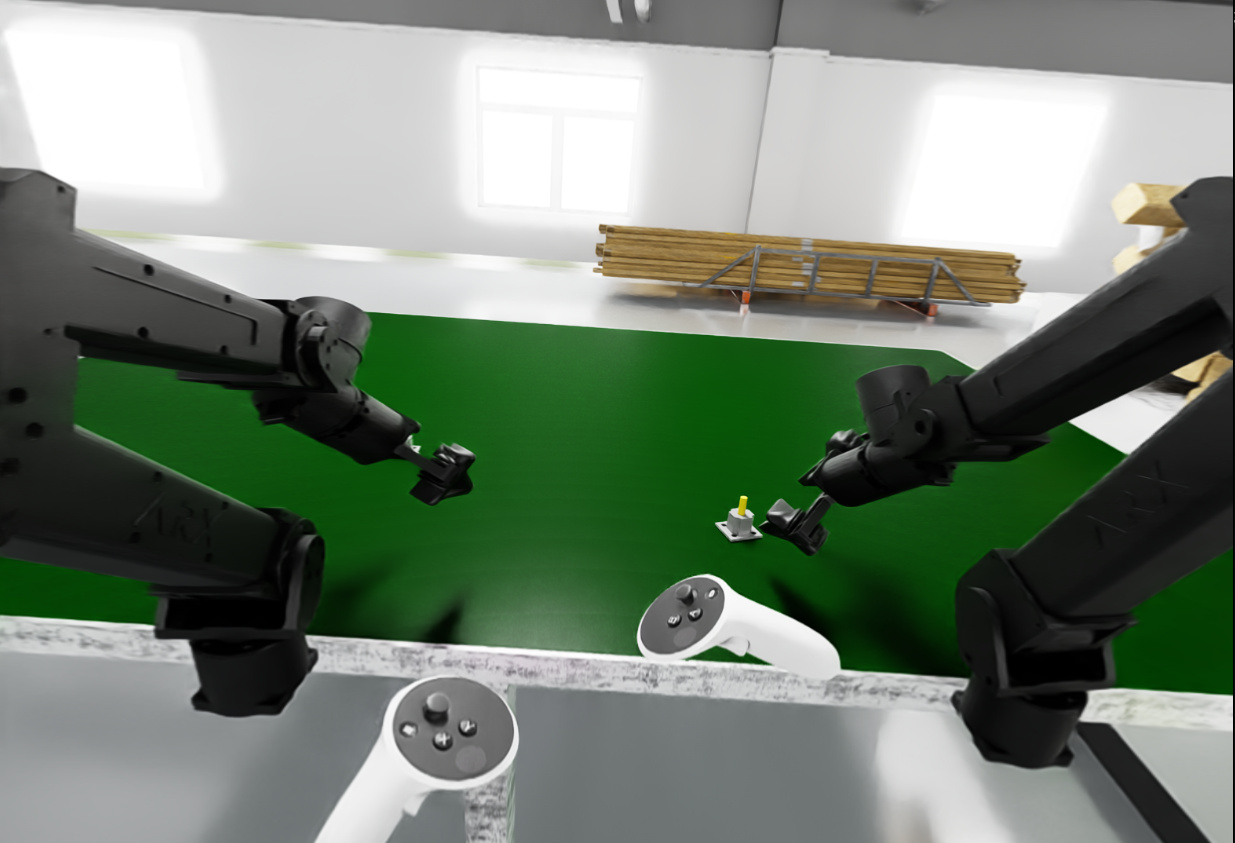
Easy Deployment and Startup
-
Connecting the VR Headset
Connect the VR headset to the data collection computer through wired or wireless methods, and launch the ALVR Client on the headset. Then start the ALVR Server on the host machine and launch SteamVR through ALVR to establish the VR input pipeline under the Linux environment.
-
Starting the Robotic Arm (Optional)
A one-click startup script is provided to automatically complete CAN communication initialization, ROS2 Topic startup, joint state subscription, and TCP service forwarding. This feature is enabled only when the input mode is set to Real Device TCP.
-
Collecting Data
The data collection tool is implemented as an Isaac Sim Extension. Users only need to select the input mode, collection task, and data storage path within a single panel to complete task loading and start trajectory recording.
Two Supported Control Input Modes
The system supports two input modes: VR Controller and Real Device TCP:
-
VR Controller:
Two VR controllers are used to independently control the end-effectors (EEF) of two robotic arms. RMPFlow and Lula Kinematics Solver are integrated for motion planning and inverse kinematics solving. -
Real Device TCP:
Supports connecting real robotic arms of the same model. Joint states are directly obtained through TCP communication, and joint values are mapped to corresponding robotic arms in the simulation environment to achieve master-slave control.
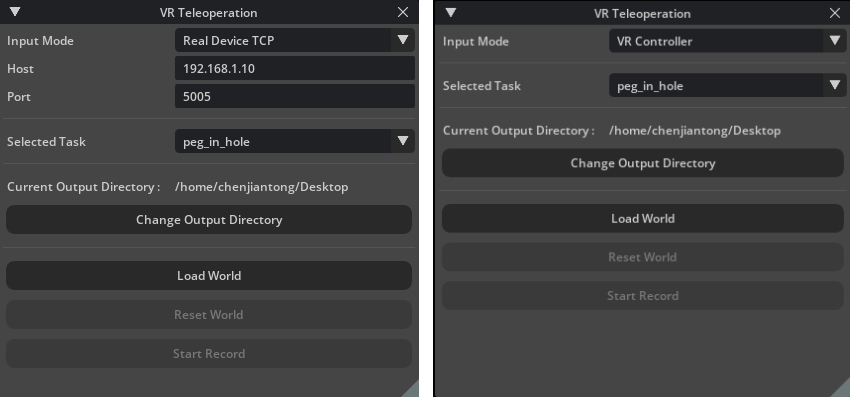
Simple and Convenient Task Extension
The system uses Task Config for task extension. When adding new tasks, users only need to add corresponding configuration files inside the Extension, including:
- Initial USD scene file path;
- Initial robot pose;
- Prim Paths that need to be recorded;
- Other optional configurations, such as physics parameter settings and Layout randomization.
New simulation tasks can then be quickly integrated.
Layout Randomization Support
Object-level scene layout randomization is supported, including two modes:
- Global randomization within the desktop workspace;
- Local perturbation randomization centered around the original position.
During randomization, multiple target objects can be treated as a single group, preventing randomization from destroying the relative positional relationships between objects.
User-friendly and Efficient Operation
-
Left Controller Joystick:
- Forward / backward / left / right movements correspond to forward / backward / left / right translation on the horizontal plane of the current viewpoint.
-
Right Controller Joystick:
- Forward / backward controls vertical movement upward / downward along the current viewpoint direction;
- Left / right controls left / right rotation on the current viewpoint plane.
Other Designs
- Clutch-based Relative Control
Under the VR Controller mode, the system adopts a clutch-based relative control method. When the clutch button is pressed, the system simultaneously locks the current controller reference pose and the robot end-effector target pose. Afterwards, only the relative motion of the controller is mapped.
After releasing the clutch button, the robot maintains its current target state.
During clutch operation, trajectory recording is paused, allowing the operator to reposition their hands without affecting the robot state before continuing manipulation. This reduces fatigue and operational burden during long-duration teleoperation.
- Trajectory Denoising
The system adopts the One Euro Filter to perform real-time filtering on VR controller position and orientation signals separately. This reduces input noise and hand jitter while maintaining operational responsiveness.
Performance Analysis
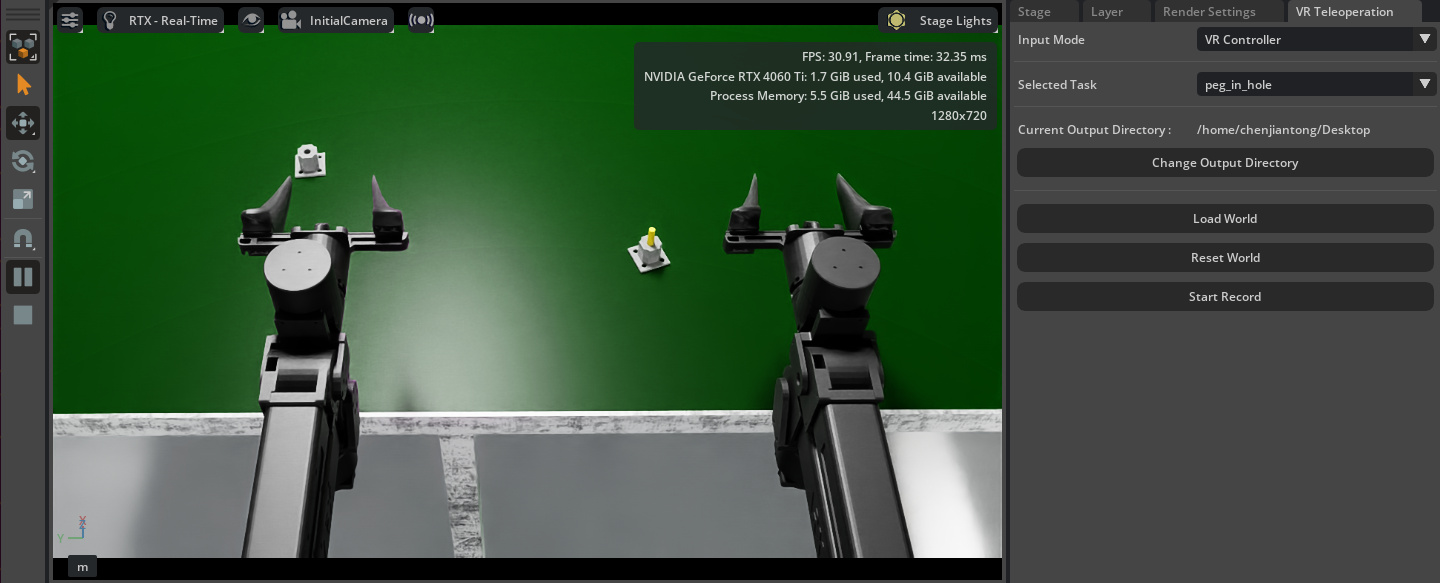
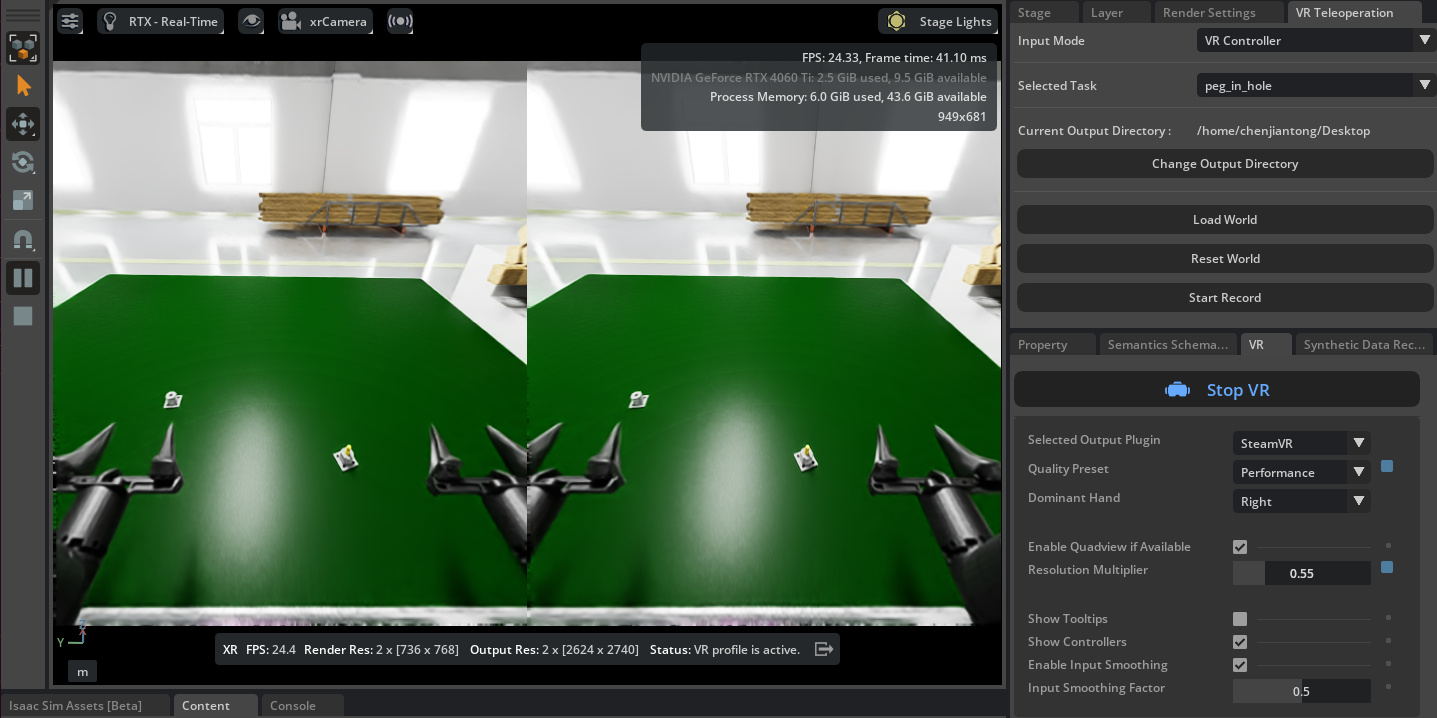
The system performance is mainly evaluated using FPS (Frames Per Second) as the core metric, which directly affects the real-time performance and smoothness of VR teleoperation. The actual FPS depends on factors including simulation scene complexity, rendering workload, and VR resolution. Taking the peg_in_hole task in EBench as an example, data collection was performed using an NVIDIA RTX 4060 Ti:
- After launching the initial scene and enabling World Play, the Isaac Sim window runs at approximately 30 FPS;
- After enabling VR data collection, both the Isaac Sim window and the VR headset run at approximately 24 FPS.
This performance can be further improved by upgrading the GPU, reducing unnecessary rendering elements in the collection scene, and lowering the VR resolution.
Overall Architecture
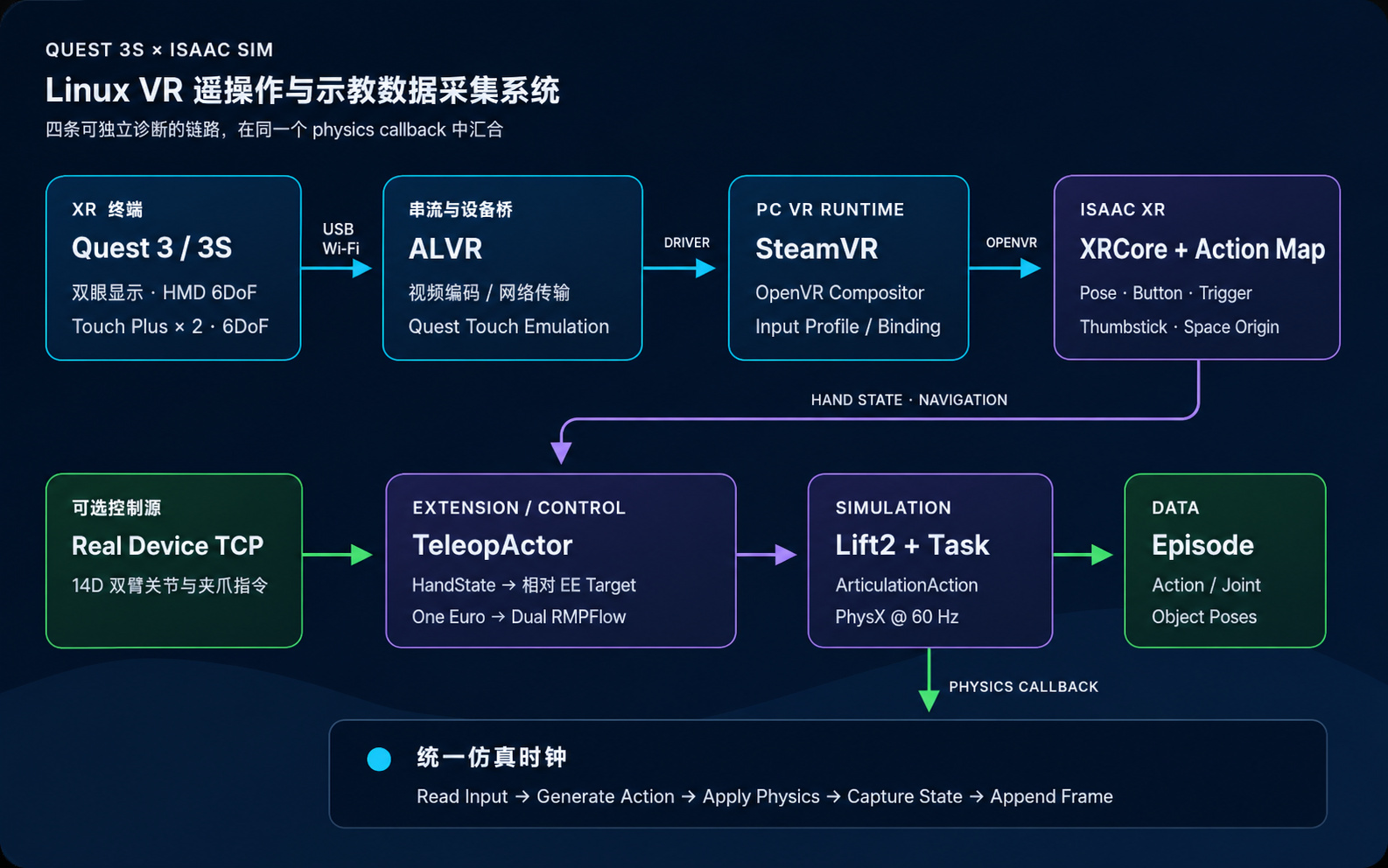
VR Headset Display Pipeline
Isaac Sim Stage / RTX Renderer
  → Isaac XR Profile / OpenVR
  → SteamVR Compositor
  → ALVR encoding and wired/wireless transmission
  → Quest stereoscopic display
Controller Input Pipeline
Quest Touch Plus
  → ALVR Controller Emulation
  → SteamVR Input Profile / Binding
  → Isaac XR Input Device
  → Unified HandState
Dual-source Robot Control Pipeline
VR: HandState
  → Relative EE Target
  → One Euro Filter
  → Lula RMPFlow
  → ArticulationAction

TCP: 14D Joint Command
  → ArticulationAction

ArticulationAction → Lift2
Data Collection Pipeline
Physics Callback
  ├─ Executed action
  ├─ Full joint positions
  ├─ Full joint velocities
  └─ World poses of robot components and task objects
        → frame
        → episode JSON